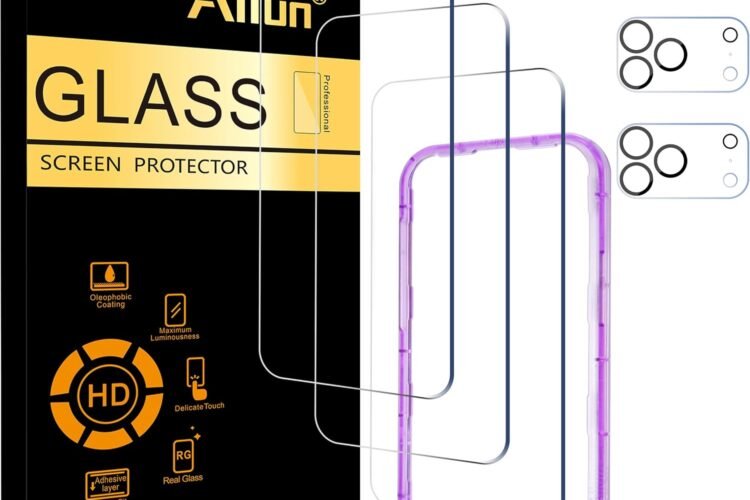
A Complete Guide to the Ailun Screen Protector and Camera Lens Protector for iPhone 18 Pro Max
The iPhone 18 Pro Max represents a significant investment in mobile technology, with a 6.9-inch display that serves as the primary interface for nearly everything you do. Protecting that display—and the sophisticated camera array on the back—is a practical consideration for many owners. This guide explores the Ailun Screen Protector and Camera Lens Protector bundle designed specifically for the iPhone 18 Pro Max, examining what the package includes, how it functions in everyday scenarios, and the factors worth weighing before making a decision.
Understanding the Product
The Ailun bundle for the iPhone 18 Pro Max is a combination package that addresses two vulnerable areas of the device: the front display and the rear camera lenses. It arrives as a 3+3 pack, meaning three tempered glass screen protectors and three camera lens protectors, along with an installation frame and a standard cleaning kit. The screen protectors are cut to fit the 6.9-inch display of the iPhone 18 Pro Max, while the camera lens protectors are designed to cover the rear camera module without interfering with the flash or the optical performance of the lenses.
Ailun offers this bundle in two distinct variants. One features clear screen protectors with standard transparency, preserving the display’s original brightness and color accuracy. The other features privacy screen protectors, which use a tinted layer to narrow the viewing angle so that only the person directly in front of the screen can see the content clearly. Both variants include the same camera lens protectors and installation accessories. The choice between them depends largely on how and where you use your phone.
The screen protectors themselves are made from tempered glass with a thickness of 0.33mm, consistent with Ailun’s other offerings for recent iPhone models. They are rated for high-definition clarity and 99.99% touch-screen accuracy, and they feature a hydrophobic and oleophobic coating to resist fingerprints and oil buildup. The camera lens protectors are also tempered glass, shaped to fit over the individual lenses or the entire camera module, depending on the design Ailun has chosen for this model.
Key Features and What They Mean in Practice
Tempered Glass Screen Protection
Tempered glass remains the most common material for screen protectors because it strikes a useful balance between scratch resistance, impact absorption, and tactile feel. The 0.33mm thickness used here is on the thinner side, which helps preserve touch sensitivity and keeps the protector from adding noticeable bulk to the phone. Thinner glass may offer slightly less impact protection than a thicker sheet, but in everyday use, the difference is often marginal. The glass is designed to absorb impact by cracking, effectively sacrificing itself to protect the display beneath—a characteristic that is often misunderstood as a sign of poor quality when it is actually the intended behavior.
Camera Lens Protection
The camera lenses on the iPhone 18 Pro Max are among the most exposed components of the device. They protrude slightly from the back panel, which means they are often the first point of contact when the phone is set down on a flat surface. Over time, this can lead to scratches on the lens cover glass, which may affect image quality, particularly in bright conditions where flare and glare become more noticeable. The camera lens protectors in this bundle add a layer of tempered glass over the lenses, absorbing the kind of wear that would otherwise reach the camera module itself.
There is an important caveat here: adding any glass over a camera lens has the potential to affect image quality, especially in low-light conditions or when shooting into bright light sources. The quality of the lens protector’s optical clarity matters a great deal. Ailun states that its lens protectors are designed to maintain the original photographic experience, but users who are particularly serious about photography may want to evaluate whether the added protection is worth the potential trade-off. For most people, the difference is imperceptible in everyday photos, but it is a factor worth being aware of.
Installation Frame and Accessories
The inclusion of an installation frame is one of the more practical aspects of this bundle. Aligning a screen protector by hand is difficult, and a misaligned protector can leave edges exposed or interfere with a case. The frame guides the glass into the correct position before the adhesive makes contact, reducing the likelihood of errors. Ailun also includes guide stickers, wet and dry wipes, and dust absorbers—tools that address the two most common installation problems: trapped dust and air bubbles.
For the camera lens protectors, installation is generally simpler because the pieces are smaller and the alignment is more forgiving. Even so, the same principles apply: a clean surface and a steady hand make a significant difference.
Oleophobic and Hydrophobic Coating
The screen protectors feature a coating designed to repel sweat and oils from your fingers. This translates to fewer smudges and a screen that stays clearer between cleanings. Over time, this coating will wear down with use, which is true of virtually all coated screen protectors. When the coating degrades, fingerprints become more visible, and cleaning becomes more frequent. This is one reason a multi-pack makes sense: eventually, the protector will need replacing, not because the glass has failed but because the surface no longer repels oil effectively.
Privacy Variant Considerations
The privacy variant of this bundle uses a tinted layer that limits the viewing angle of the display. For someone who frequently uses their phone on public transit, in crowded waiting rooms, or in any setting where shoulder-surfing is a concern, this can be a meaningful feature. The trade-off is that privacy protectors typically reduce overall brightness and can make the screen harder to read at an angle, even for the person using the phone. They also tend to have a slightly different feel than standard clear protectors. Whether the privacy benefit outweighs these compromises depends entirely on the user’s priorities.
Case-Friendly Design
Both the screen protectors and the camera lens protectors are designed to be compatible with most phone cases. The screen protector is cut to accommodate the Dynamic Island and the sensor array, and its edges are shaped to fit within the tolerances of typical cases. The camera lens protectors are shaped to fit over the camera module without adding enough bulk to interfere with a case’s cutout. That said, case fit varies, and a case with an unusually tight camera cutout or a raised lip that sits very close to the screen edge may still cause issues. Choosing a case that is noted as compatible with screen protectors can reduce this risk.
How the Bundle Fits Into Daily Use
For the Everyday Carrier
A screen protector and camera lens protector are most valuable in the small, unremarkable moments of the day: sliding the phone into a bag alongside keys, setting it face-down on a table, or pulling it from a pocket where a bit of grit has accumulated. The screen protector takes the brunt of these micro-contacts, while the camera lens protectors guard the rear module when the phone is set down. The oleophobic coating on the screen also helps during commutes, when fingers are often slightly oily or damp, keeping the display readable without constant wiping.
For the Frequent Traveler
Airports, train stations, and hotel rooms are environments where phones get handled more than usual—placed in security bins, balanced on luggage handles, passed between hands. A tempered glass screen protector provides reassurance that a scratch or scuff will land on the protector rather than the display. The camera lens protectors are particularly relevant for travelers who frequently set their phone down on unfamiliar surfaces. The three-pack format means that if a protector cracks during a trip, a spare is already on hand, avoiding the need to search for a replacement in an unfamiliar city.
For the Photography Enthusiast
The camera system on the iPhone 18 Pro Max is one of its defining features, and protecting the lenses is a reasonable priority for anyone who takes photography seriously. The lens protectors in this bundle offer a layer of defense against the scratches and scuffs that can accumulate over time. That said, photographers who are particularly discerning about image quality may want to test the lens protectors in a variety of conditions—especially low light and high-contrast scenes—to confirm that the optical clarity meets their standards. For casual and everyday photography, the difference is likely to be minimal.
For the Privacy-Conscious User
The privacy variant of this bundle addresses a specific concern: the ability of others to read your screen in public settings. For someone who handles sensitive information, commutes on crowded transit, or simply values personal privacy, the narrowed viewing angle can be a meaningful addition. The trade-off in brightness and color accuracy is real, but for some users, the privacy benefit is worth it. Those who frequently share their screen with others or who use their phone in bright outdoor conditions may find the standard clear variant more suitable.
For the Household With Multiple Devices
The 3+3 format is generous, and for a household with more than one iPhone 18 Pro Max—or for someone who simply wants spares on hand—it reduces the need for repeat purchases. Buying a single bundle that covers multiple devices or provides backups can be more economical than purchasing individual protectors, though it does require that all devices share the same model.
Who This Product May Be Suitable For
The Ailun Screen Protector and Camera Lens Protector bundle tends to appeal to a few broad categories of users.
Practical minimalists who want basic protection for both the screen and the camera without paying for premium features may find this bundle meets their needs. It covers the fundamentals—scratch resistance, impact absorption, and oil resistance—without adding unnecessary complexity.
Frequent installers and tinkerers who like to replace their protector every few months, or who have cracked one in the past and want spares on hand, will appreciate the multi-pack format. The cost per protector is generally lower than buying singles, and the installation frame makes repeat installations less tedious.
Photography-focused users who want to protect the camera lenses without adding a bulky case may find the lens protectors particularly useful. The bundle addresses both the front and rear of the phone in a single purchase.
Privacy-conscious users who opt for the privacy variant may find that the narrowed viewing angle addresses a specific concern that standard protectors do not.
Owners of the iPhone 18 Pro Max are the only ones who can use this product. The screen protectors are cut for the 6.9-inch display, and the camera lens protectors are shaped for the specific camera module of this model. They will not fit other iPhone models.
Important Things to Consider
Model Compatibility Is Specific
The most important consideration is compatibility. This bundle is designed exclusively for the iPhone 18 Pro Max. The screen protectors will not fit the iPhone 18 Pro, iPhone 17 Pro, iPhone 17 Pro Max, or any other model. The camera lens protectors are similarly shaped for the specific camera module of the iPhone 18 Pro Max. If you are unsure which model you have, checking the model number in the phone’s settings is a good first step.
Installation Requires Care
Even with an installation frame, applying a screen protector is a task that benefits from patience. Dust is the primary enemy; a single particle trapped under the glass can create a visible bubble that cannot be pressed out. Working in a clean, well-lit space, washing hands, and using the included dust absorbers can improve the outcome. Some users find that installing a protector in a bathroom after running a hot shower—where steam helps settle airborne dust—reduces the chance of particles getting trapped. The camera lens protectors are smaller and generally easier to install, but the same principles apply.
Camera Lens Protectors and Image Quality
This is perhaps the most nuanced consideration. Adding a layer of glass over a camera lens has the potential to affect image quality, particularly in conditions where flare and glare are already a concern. The quality of the optical clarity of the lens protector matters a great deal. While Ailun states that its lens protectors are designed to maintain the original photographic experience, users who are particularly serious about photography may want to evaluate the trade-off between protection and optical performance. For most everyday photos, the difference is likely to be negligible, but it is worth being aware of.
Adhesive Quality and Edge Lifting
The adhesive used on screen protectors varies, and edge lifting is a common complaint across many brands. A protector that lifts at the edges can collect dust and eventually peel off entirely. Case fit plays a role here: a case that presses against the protector’s edge can cause lifting over time. Choosing a case with a slightly recessed lip or one specifically noted as compatible with screen protectors can help mitigate this. The camera lens protectors are less prone to edge lifting because they are smaller and sit within the camera module cutout, but they can still be affected by case fit.
Coating Longevity
The oleophobic coating on the screen protectors will wear off with use, typically within a few months for heavy users. When it does, the screen will attract more fingerprints and feel less smooth. Some users replace the protector at this point; others continue using it until it cracks or becomes visibly scratched. There is no right or wrong approach, but it is worth knowing that the coating is a wear item, not a permanent feature.
Privacy Variant Trade-Offs
If you are considering the privacy variant, it is worth understanding the trade-offs before committing. Privacy protectors reduce brightness and color accuracy, and they can make the screen harder to read at an angle. They also tend to have a slightly different tactile feel than standard clear protectors. For some users, the privacy benefit is worth these compromises; for others, it is not. There is no universal answer, and the right choice depends on how and where you use your phone.
Not a Substitute for a Case
A screen protector and camera lens protector guard the display and the camera module, but they do not protect the back, sides, or frame of the phone. For comprehensive protection, a case is still advisable. Some users pair these protectors with a slim case to keep the overall profile of the phone manageable while still covering the essentials.
Comparing General Categories of Protection
Clear vs. Privacy Screen Protectors
Clear protectors preserve the display’s brightness and color accuracy, making them the default choice for most users. Privacy protectors narrow the viewing angle, which is useful in crowded settings but comes at the cost of reduced brightness and color fidelity. The Ailun bundle offers both variants, allowing users to choose based on their priorities.
Screen Protector Only vs. Screen and Camera Bundle
A screen protector alone addresses the most vulnerable and most frequently touched part of the phone. A bundle that includes camera lens protectors addresses the rear module as well, which is particularly relevant for phones with protruding lenses. The bundle format is convenient for users who want comprehensive coverage in a single purchase, though those who are particularly concerned about camera image quality may prefer to use only a screen protector and rely on a case with a raised camera lip for rear protection.
Tempered Glass vs. Plastic Film
Tempered glass, which is what this bundle uses, offers superior scratch resistance and a more natural feel than plastic film. It is also more effective at absorbing impact, though it is thicker and can crack under pressure. Plastic film protectors are thinner, cheaper, and less prone to cracking, but they scratch more easily and tend to feel less smooth. For most users, tempered glass is the preferred choice for a phone with a glass display.
Single Packs vs. Multi-Packs
Single protectors are often slightly cheaper per unit but leave no room for installation errors or future replacements. Multi-packs like the Ailun 3+3 bundle cost more upfront but reduce the cost per protector and provide backups. For users who plan to keep their phone for several years or who have cracked a protector before, a multi-pack is often the more practical choice.
Frequently Asked Questions
Will this bundle fit the iPhone 18 Pro or the iPhone 17 Pro Max?
No. This bundle is designed specifically for the iPhone 18 Pro Max. The screen protectors are cut for the 6.9-inch display, and the camera lens protectors are shaped for the camera module of this model. Other iPhone models require different sizes.
Do the camera lens protectors affect photo quality?
Adding glass over a camera lens can potentially affect image quality, particularly in low-light or high-contrast conditions. Ailun states that its lens protectors are designed to maintain the original photographic experience, but users who are particularly serious about photography may want to test the protectors in a variety of conditions to confirm they meet their standards. For most everyday photos, the difference is likely to be minimal.
Does the screen protector interfere with Face ID or the front camera?
The screen protector is cut to accommodate the Dynamic Island and the sensor array, so it should not obstruct Face ID or the front-facing camera. However, if the protector is misaligned during installation, it could partially cover a sensor. Using the installation frame helps prevent this.
Can I use these protectors with a phone case?
Both the screen protectors and the camera lens protectors are designed to be compatible with most phone cases. That said, case fit varies, and a case with a very tight lip or a raised camera cutout may cause issues. Choosing a case that is noted as compatible with screen protectors can reduce this risk.
How do I remove air bubbles after installation?
Small air bubbles often disappear on their own within a day or two as the adhesive settles. Larger bubbles may need to be gently pushed toward the nearest edge with a soft card or your finger. If a bubble persists and contains a dust particle, lifting the corner of the protector, removing the particle with a dust absorber, and pressing the protector back down may resolve it.
How often should I replace the protectors?
There is no fixed schedule. Some users replace the screen protector when the oleophobic coating wears off and fingerprints become bothersome. Others wait until it cracks or becomes visibly scratched. The camera lens protectors are typically replaced less frequently, as they are less exposed to daily wear. If a protector cracks, replacing it promptly is advisable.
Does the screen protector affect touch sensitivity?
At 0.33mm, the glass is thin enough that most users will not notice a difference in touch sensitivity. The product is advertised as offering 99.99% touch-screen accuracy. Users who are particularly sensitive to touch latency may want to test the protector before committing to long-term use.
Is the privacy variant worth choosing over the clear variant?
This depends entirely on your priorities. The privacy variant is useful if you frequently use your phone in crowded settings and want to prevent others from reading your screen. The trade-off is reduced brightness and color accuracy, and a narrower viewing angle. The clear variant preserves the display’s original characteristics. There is no universal answer.
Can the protectors be removed without damaging the phone?
Yes. Tempered glass protectors are designed to be removable. Lifting a corner with a fingernail or a thin plastic tool and peeling the protector away is usually sufficient. Any adhesive residue can typically be wiped off with a soft cloth.
What is included in the package?
The package includes three tempered glass screen protectors, three camera lens protectors, an installation frame, guide stickers, wet and dry wipes, and dust absorbers. The exact contents may vary slightly depending on the variant, so checking the product listing is recommended.
Conclusion
The Ailun Screen Protector and Camera Lens Protector bundle for the iPhone 18 Pro Max is a practical option for anyone looking to add a basic layer of protection to both the front display and the rear camera module. It covers the essentials—tempered glass construction, an oleophobic coating, case-friendly cuts, and an installation frame—without venturing into premium territory or adding unnecessary features. The 3+3 format is a thoughtful inclusion, acknowledging that installation is not always perfect on the first try and that protectors are wear items that eventually need replacing. The availability of both clear and privacy variants means users can choose based on their priorities.
That said, it is not a one-size-fits-all solution. Compatibility is limited to a single model, installation requires patience, the coating will wear down over time, and the camera lens protectors introduce a consideration around image quality that is worth evaluating. For users who want straightforward protection at a reasonable cost and who are comfortable with a bit of DIY installation, it may be a good fit. For those who prioritize maximum impact protection, premium alignment systems, or uncompromised camera performance, other options may be worth exploring.